I’m so excited to have a handy Philly Chit Chat icon right on my home iPhone home screen (this works on android too!) That means a mobile optimized experience is just one press away!

From the browser, pull up PhillyChitChat on your phone via the internet, then just press the share icon – see red box:

Then ‘Add to home screen’ is listed right there on the 2nd row (though you might have to scroll over to see it).

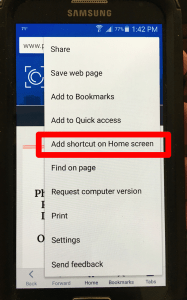
On android, from within a web browser, press and hold the menu button and then press ‘Add shortcut on Home Screen’
Thanks for to Mike Toub for sharing this tip with me. BTW, the home screen pictured above is his (mine is not nearly that cluttered or organized as he would say)!!! Now you can see what I post every day. Plus access all my social media cause often I put tidbits & info there that don’t make the blog.